
Setting compass zones
Set the compass zone corresponding to the vehicle's geographic location so that the compass
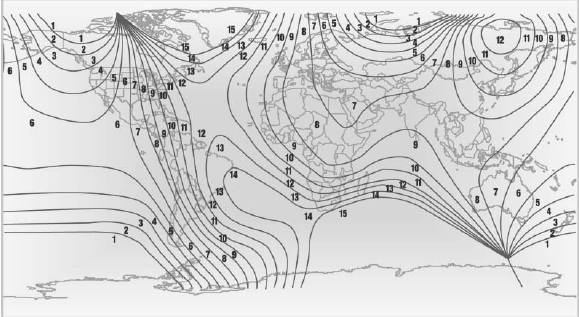
Setting compass zones
Press the adjustment button for 3‑4 seconds.
The number of the compass zone set is shown in the display.
To change the zone setting, briefly press the adjustment button repeatedly until the display shows the number of the compass zone corresponding to the current location. can function correctly; refer to the world map with compass zones.
The compass is operational again after approx.
10 seconds.
See also:
System limits
Top View cannot be used in the following situations:
With a door open.
With the trunk lid open.
With an exterior mirror folded in.
In poor light.
A Check Control message is displayed in s ...
Activating the assistance functions
More than one assistance function can be active
at the same time.
Showing the parking aid lines
"Parking aid lines"
Pathway and turning circle lines are displayed.
Showing the obstacl ...
Pinch protection system
If the closing force exceeds a specific value as a
window closes, the closing action is interrupted.
The window reopens slightly.
Danger of pinching even with pinch protection
Even with the pin ...