
Digital compass
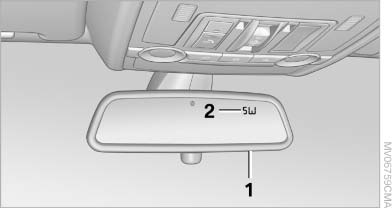
Digital compass
1. Adjustment button
2. Display
The display shows you the main or secondary compass direction in which you are driving.
See also:
Radio ready state and ignition off
All indicator and warning lamps as well as displays
in the instrument cluster go out.
Transmission position P with the ignition
off
When the ignition is switched off, position P is
engaged a ...
Safety notes
Do not remove the cover
The BMW CD/DVD player is a Class 1 laser
product. Do not operate if the cover is damaged;
otherwise, severe eye damage can result.◀ ...
Controls on the interior rearview mirror
Controls on the interior rearview mirror
▷ LED, arrow 1.
▷ Buttons, arrow 2.
▷ The hand-held transmitter, arrow 3, is required
for programming. ...