
Activating/deactivating via iDrive
1. "Settings"
2. "Lighting"
3. "High beam assistant"
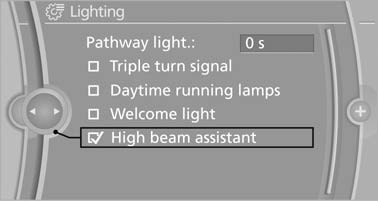
High beam assistant
The setting is stored for the remote control currently in use.
See also:
Display
Instrument cluster
Instrument cluster
Instrument cluster with enhanced
features
Instrument cluster with enhanced features ...
Image on the Control Display
Switching on the rear view camera
using iDrive
With Top View activated:
"Rear
view camera"
The image of the rear view camera is displayed.
The setting is stored for the ...
Indication of a flat tire
The warning lamp
lights up red. A
message appears on the Control Display.
In addition, a signal sounds.
There is a flat tire or a major loss in tire inflation
pressure.
Reduce your speed and ...