
Front seats: adjusting the distance from the back of the head
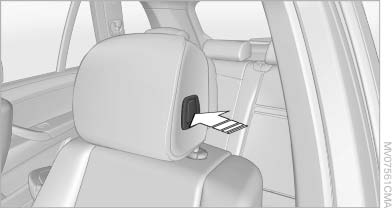
Front seats: adjusting the distance
from the back of the head
Press the button and pull the headrest cushion forward or push it back.
 Compromised performance
Do not place any objects behind the headrest
cushion. Otherwise, you can impair the
proper function of the head restraint.◀
See also:
Maintenance
Maintain the vehicle regularly to sustain the road
safety, operational reliability and the New Vehicle
Limited Warranty.
Specifications for required maintenance measures:
▷ BMW Maintenance ...
Preparing and loading the ski bag
1. Fold open the center arm rest and the lid on
the inside.
2. Open the inside cover and cargo area by
pressing the button.
3. Lay out the ski bag.
4. Load the ski bag. If necessary, wrap the ...
Switching on/off manually
Switching on/off manually
Press the button.
▷ On: the LED lights up.
▷ Off: the LED goes out.
The PDC is shown on the Control Display.
Switch on the backup camera via the iDrive. ...