
Notes
Displaying notes
1. "Office"
2. "Notes"
All notes are displayed.
Displaying a note1. Select the desired note.
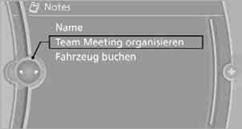
2. To scroll through the note, if necessary:
> Turn the controller.
> Select the 
 symbol.
Using contact data
Contact data from appointments, tasks, text messages, emails, and notes can be stored or selected.
Reading a note aloud
Reading a note aloud.
See also:
General information
Lamps and bulbs make an essential contribution
to vehicle safety.
The manufacturer of your vehicle recommends
that you entrust corresponding procedures to
your service center if you are unfamil ...
Vehicle equipment
All standard, country-specific and optional
equipment that is offered in the model series is
described in this chapter. Therefore, equipment
is also described that is not available in a vehicle,
e ...
At a glance
Contacts can be created and edited. The contacts
from the mobile phone are displayed as
well if this function is supported by the mobile
phone. The addresses can be adopted as destinations
for ...