
Radio Data System RDS
In the FM waveband, additional information is transmitted via RDS. If the reception conditions are good, the station names are shown on the Control Display. Where reception is poor or in the event of interference, it may take some time before the station names appear in the display.
Switching the RDS on/off
1. "Radio"
2. "FM"
3. Open "Options".
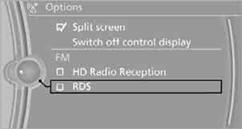
4. "RDS"
The setting is stored for the remote control currently in use.
See also:
Signal tones
When approaching an object, an intermittent
tone is sounded that indicates the position of the
object. For example, if an object is detected to
the left rear of the vehicle, a signal tone sounds ...
Buttons at a glance
1. System on/off, interrupt
2. Resume speed
3. Store speed
4. Reduce distance
5. Store, maintain/change speed
6. Increase distance ...
Long-term vehicle storage
Your service center can advise you on what to
consider when storing the vehicle for longer
than three months. ...