
Climate
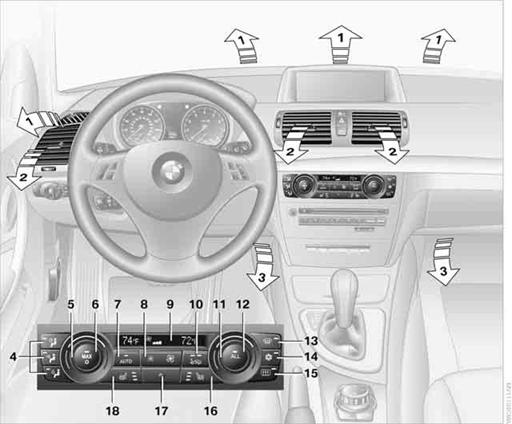
1. Airflow directed toward the windshield and side windows
2. Air to the upper body area: Draft-free ventilation
3. Air to the footwell
4. Air distribution, manual
5. Temperature, left side
6. Maximum cooling
7. AUTO program
8. Air volume, manual adjustment; AUTO intensity
9. Display
10.Automatic recirculated air control AUC/ Recirculated air mode
11.Temperature, right side
12.ALL program
13.Defrosting windows and removing condensation
14.Switching cooling function on/off manually
15.Rear window defroster
16.Seat heating, right side
17.Interior temperature sensor, please keep clear
18.Seat heating, left side
See also:
Capturing the image
The image is captured by two cameras
integrated in the exterior mirrors and by the
backup camera.
The range is at least 7 ft/2 m to the side and rear.
In this way, obstacles up to the height of ...
ECO PRO
Consistent tuning to minimize fuel consumption
for maximum range with maximum driving stabilization.
Comfort functions and the engine controller are
adjusted.
The program can be configured to in ...
Service requirements
The remaining driving distance and the date of the next scheduled service are
displayed briefly immediately after you start the engine or switch on the ignition.
The extent of service work requi ...