
Parked car ventilation
The concept
The parked car ventilation provides ventilation to the passenger compartment and lowers its temperature, if necessary.
The parked car ventilation system is operated via iDrive. Two different switch-on times can be preselected.
The parked car ventilation remains switched on for approx. 30 minutes. The system can also be switched on and off directly. Due to its high power consumption, it should not be switched on twice in a row without driving in between to allow the battery to recharge.
The parked car ventilation system comes on if the outside temperature is above 59 7/15 6 when the switch-on time was preselected, but is ready for use at any temperature when the system is switched on directly.
The air emerges from the air vents for the upper body area in the instrument panel. The air vents must therefore be open.
Switching on and off directly1. "Settings"
2. "Climate"
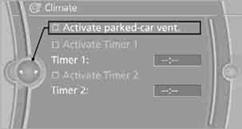
3. "Activate parked-car vent."
 The symbol on the automatic climate control display
flashes.
The symbol on the automatic climate control display
flashes.
1. "Settings"
2. "Climate"
3. "Activate Timer 1" or "Activate Timer 2"
4. "Timer 1:" or "Timer 2:"
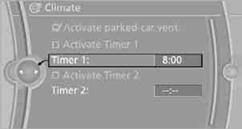
5. Turn the controller: set the hours.
6. Press the controller: the setting is accepted.
7. Turn the controller: set the minutes.
8. Press the controller: the setting is accepted.
The symbol on the automatic climate Control
Display lights up.
The symbol on the automatic climate Control Display
flashes when the system has switched on.
 The respective system is switched on within the
next 24 hours only. After these have elapsed, it must be reactivated.
The respective system is switched on within the
next 24 hours only. After these have elapsed, it must be reactivated.
See also:
Configuring the prewarning
After the warning function is switched on, the
following can be set via the iDrive:
▷ The prewarning can be switched on/off.
▷ The time of the prewarning can be set.
These settings ha ...
Ventilation in rear
Ventilation in rear
1. Use the thumbwheels to smoothly open and
close the air vents
2. Thumbwheels to adjust temperature in upper
body region; can be adjusted separately
for left and right:
...
Treble, bass, balance, and
fader
▷ "Treble": treble adjustment.
▷ "Bass": depth adjustment.
▷ "Balance": left/right volume distribution.
▷ "Fader": front/rear volume ...