
Seat and mirror memory
You can store and call up two different combinations of driver's seat and exterior mirror positions.
Settings for the backrest width and lumbar support are not stored in memory.
Storing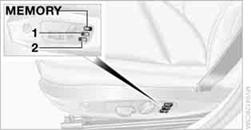
1. Switch on radio readiness or the ignition.
2. Adjust the seat and exterior mirrors to the desired positions.
3. Press the  button.
The LED in the button lights up.
4. Press the desired memory button 1or 2:
the LED goes out.
Call-up Do not call up the memory while you are driving;
otherwise, unexpected seat movement could result in an accident.
Do not call up the memory while you are driving;
otherwise, unexpected seat movement could result in an accident.
Comfort function
1. Unlock and open the driver's door or switch on radio readiness.
2. Briefly press the desired memory button 1
or 2.
The adjusting procedure is halted when you touch a seat adjustment switch or one of the memory buttons.
Safety feature
1. Close the driver's door and switch the ignition on or off.
2. Press the desired memory button 1or 2and keep it pressed
until the adjustment process has been completed.
If the  button was pressed accidentally: Press
the button again; the LED goes out.
button was pressed accidentally: Press
the button again; the LED goes out.
See also:
Activating/deactivating the functions
Several menu items are preceded by a checkbox.
It indicates whether the function is activated
or deactivated. Selecting the menu item
activates or deactivates the function.
The function is acti ...
Incoming call
Receiving calls
If the number of the caller is stored in the phone
book and is transmitted by the network, the
name of the contact is displayed. Otherwise,
only the phone number is displayed.
...
Intelligent lightweight design brings further reduction in fuel consumption
and CO2 emissions
Use of lightweight materials has played a significant role in reducing
vehicle weight and in delivering high passenger cell safety standards, combined
with a significant increase in strength. At t ...