
Heated seats
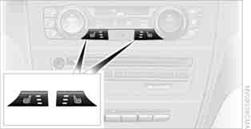
Press the button once per temperature level. Three LEDs indicate the highest temperature.
To switch off:
Press button longer.
If you continue driving within approx. the next 15 minutes, the seat heating is automatically activated at the previously set temperature.
The temperature is lowered or the heating is switched off entirely to save on battery power. The LEDs stay lit.
See also:
Applying
The lever automatically engages after being
pulled up. ...
Switching the reception on/off
1. "Navigation"
2. Open "Options".
3. "Receive Traffic Info" ...
Oil types for refilling
Notes
No oil additives
Oil additives may lead to engine damage.◀
Viscosity grades for engine oils
When selecting an engine oil, ensure that
the engine oil belongs to one of the viscosity ...