
Socket for OBD Onboard Diagnosis
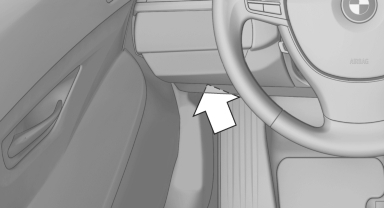
There is an OBD socket on the driver's side for checking the primary components in the vehicle emissions.
Emissions

The warning lamp lights up:
Emissions are deteriorating. Have the vehicle checked as soon as possible.

The warning lamp flashes under certain circumstances:
This indicates that there is excessive misfiring in the engine.
Reduce the vehicle speed and have the system checked immediately; otherwise, serious engine misfiring within a brief period can seriously damage emission control components, in particular the catalytic converter.
Fuel cap

The indicator lamp lights up.
If the fuel cap is not properly tightened, the OBD system may conclude that fuel vapor is escaping. If the cap is then tightened, the display should go out in a short time.
Data memory
Your vehicle records data relating to vehicle operation, faults and user settings. These data are stored in the remote control and can be read out with suitable devices, particularly when the vehicle is serviced. The data obtained in this way provide valuable information for service processes and repair or for optimizing and developing vehicle functions further.
In addition, if you signed a service contract for Assist, certain vehicle data can be sent directly from the vehicle to facilitate the desired services.
See also:
Displaying stored Check Control
messages
1. "Vehicle Info"
2. "Vehicle status"
3. "Check Control"
4. Select the text message. ...
Example: dialing a phone number
1. Briefly press
the button on the
steering wheel.
2. ›Dial number‹
The system says: »Please say the number«.
3. For instance, ›123 456 790‹
The system says: »123 456 790. Continue?
...
Towing other vehicles
General information
Light towing vehicle
Your vehicle must not be lighter than the
vehicle being towed; otherwise, it will not be
possible to control vehicle response.◀
Attaching the ...