
Controls
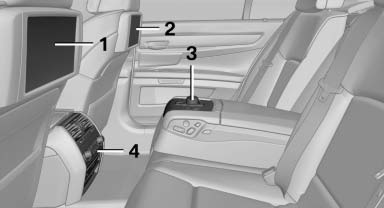
1 Screen, left
2 Screen, right
3 Controller with buttons
4 CD/DVD player
See also:
Double-joint front axle with spring struts and anti-roll bar
The front axle of the new BMW sports sedan is based on a proven design which
provides an optimal fusion of driving dynamics and comfort. The wheel suspension
combines maximum stiffness with minimu ...
Important features in the engine compartment
1 Washer fluid reservoir
2 Vehicle identification number
3 Jump-starting, negative terminal
4 Jump-starting, positive terminal
5 Coolant reservoir
6 Oil filler neck ...
Child seat security
Child seat security
The rear safety belts and the front passenger
safety belt can be locked against pulling out for
mounting the child restraint fixing systems.
Locking the safety belt
1. P ...