
Rear CD/DVD player
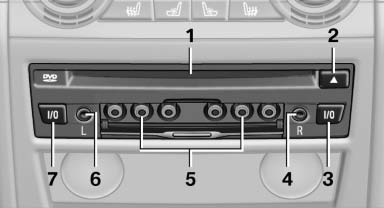
1 CD/DVD slot
2 Eject CD/DVD
3 On/off, right
4 Headphone connection, right
5 RCA sockets
6 Headphone connection, left
7 On/off, left
See also:
Opening
▷ Press the switch to the
resistance
point.
The window opens while the switch is held.
▷ Press the switch beyond the
resistance
point.
The window opens automatically.
Pressin ...
At a glance
The destinations previously entered are stored
automatically.
These destinations can be called up and used
as a destination for destination guidance. ...
Closing
Danger of pinching
Monitor the closing process and make
sure that the closing path of the window is clear;
otherwise, injuries may result.
Pull the switch to the resistance point.
The win ...