
Equalizer
Setting for individual audio frequency ranges.
Adjusting the equalizer
1. "CD/Multimedia", "Radio" or "Settings"
2. "Tone"
3. "Equalizer"
4. Select the desired setting.
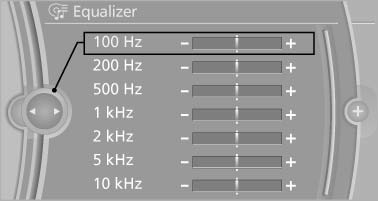
5. To adjust: turn the controller.
6. To store: press the controller.
See also:
Starting the engine
Automatic transmission
Starting the engine
1. Depress the brake pedal.
2. Press the Start/Stop button.
The ignition is activated automatically for a certain
time and is stopped as soon as the e ...
X3 in the Market
At $38,000, the X3 starts substantially higher than its nearest competitor,
the Acura RDX. Save for its problematic transmission behavior, the BMW offers a
more buttoned-down driving experience th ...
Windshield washer nozzles
The washer jets are automatically heated whenever
the ignition is switched on. ...