
Front ventilation
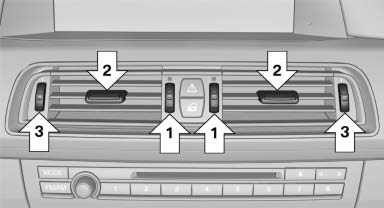
- Thumbwheels for adjusting the temperature,
arrows 1.
Toward blue: colder.
Toward red: warmer. - Lever for changing the air flow direction, arrow 2.
- Thumbwheels for opening and closing the vents continuously, arrows 3.
Ventilation levels
- Draft-free ventilation:
Thumbwheel, arrow 3, in level :
the air
current is fanned out.
:
the air
current is fanned out. - Maximum air volume:
Thumbwheel, arrow 3, in level
 :
the air is
partially fanned out and partially bundled.
This maximizes the air supply.
:
the air is
partially fanned out and partially bundled.
This maximizes the air supply. - Direct ventilation:
Thumbwheel, arrow 3, in level
 :
the air is
bundled and can be directed to a specific
point.
:
the air is
bundled and can be directed to a specific
point.
Adjusting the ventilation
- Ventilation for cooling: Adjust the vent to direct the air in your direction, e.g., if the vehicle interior is hot from the sun.
- Draft-free ventilation: Adjust the vent to let the air flow past you.
See also:
Possible commands
Having possible commands read aloud
The commands available in each case depend
on the menu item selected on the Control Display.
To have the available commands read out
loud: ›Voice commands‹
F ...
Vehicle equipment
All standard, country-specific and optional
equipment that is offered in the model series is
described in this chapter. Therefore, equipment
is also described that is not available in a vehicle,
e ...
Flat Tire Monitor FTM
The conceptThe system does not measure the actual inflation pressure in the tires.
The system detects a pressure loss in a tire by comparing the rotational speeds
of the individual wheels while mov ...