
Display
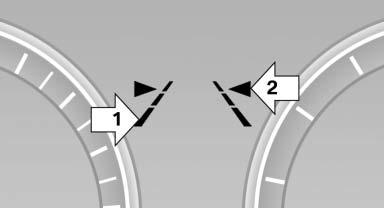
▷ Lines, arrow 1: the system is activated. ▷ Arrows, arrow 2: at least one lane marking was detected and warnings can be issued.
See also:
Range
After the reserve range is
reached:
▷ A Check Control message is
displayed briefly.
▷ The remaining range is
shown on the computer.
▷ When a dynamic driving style is used, ...
Functional requirements
▷ There are no external sources of interference
nearby.
▷ To lock the vehicle, the remote control must
be located outside of the vehicle.
▷ The next unlocking and locking cycle ...
Overview
2011 BMW X5 will write the latest chapter in the story of the world's first
Sports Activity Vehicle® in the spring of 2010. Originally launched for the 2000
model year in late 1999, the BMW X5 per ...