
Activating the High-beam Assistant
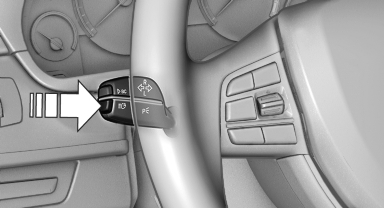
1. Turn the light switch to  or
or
 .
.
2. Press the button on the turn signal lever, arrow.
 The indicator lamp in the
instrument
cluster lights up.
The indicator lamp in the
instrument
cluster lights up.
When the lights are switched on, the high beams are switched on and off automatically.
The system responds to light from oncoming traffic and traffic driving ahead of you, and to adequate illumination, e.g., in towns and cities.
See also:
Calls with multiple parties
General information
You can switch between calls or connect two
calls to a single conference call. These functions
must be supported by the mobile phone and
service provider.
Accepting a call ...
Roadside parking lamps
The vehicle can be illuminated on one side.
Switching on
With the ignition switched off, press the lever
either up or down past the resistance point for
approx. 2 seconds.
Switching off
Briefl ...
TeleService
General information
TeleService supports communication with your
service center.
▷ Data on the vehicle's service requirements
can be sent directly to the service center. In
this way, the ...