
Manual release
The parking brake can be released manually in the event of a power failure or electrical fault.
 Before releasing, secure the vehicle
against rolling
Before releasing, secure the vehicle
against rolling
Before releasing the parking brake manually, and whenever you park the vehicle with the parking brake released, ensure that position P of the automatic transmission is engaged.
Secure the vehicle in a manner appropriate to the inclination of the road, e.g., with a wheel chock; otherwise, there is the danger of the vehicle rolling.
Unlocking
1. Remove the release tool from the tool kit.
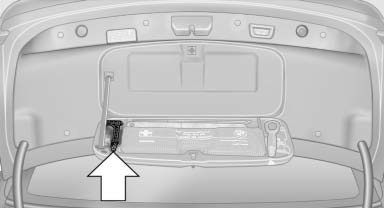
2. Raise the floor panel in the cargo area.
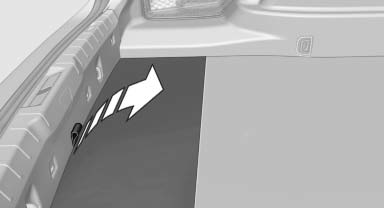
3. Take out the floor trim in the cargo area, removing the screws with the release tool, arrows.
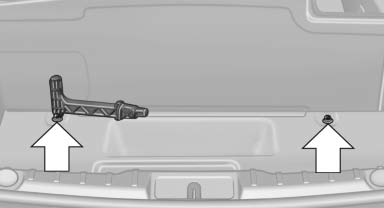
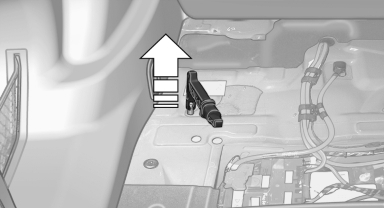
4. Place the release tool on the release point, arrow.
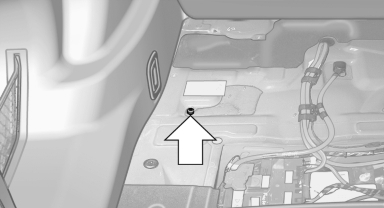
5. Forcefully pull the release tool up against the resistance until you notice a marked increase in the resistance and the parking brake releases audibly.
Have the malfunction corrected
If the parking brake has been released manually in response to a malfunction, only technicians can return it to operation.
Have the malfunction corrected by your service center.
See also:
Clean the windshield, headlamps
Pull the lever.
The system sprays washer fluid on the windshield
and activates the wipers briefly.
In addition, the headlamps are cleaned at regular
intervals when the vehicle lights are switc ...
DVD changer
Above the glove compartment
Press the button.
The cover opens automatically.
To close: press the cover closed.
Controls and displays
1 Empty DVD compartments
2 LED on DVD slot
3 Buttons for ...
Condition Based Service CBS
Sensors and special algorithms take into account
the driving conditions of your vehicle.
Based on this, Condition Based Service determines
the maintenance requirements.
The system makes it possi ...