
Adjusting the height: manual head restraints
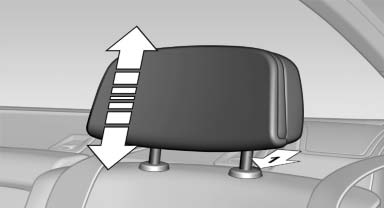
The height of the outer head restraints can be adjusted.
- To raise: pull.
- To lower: press the button, arrow 1, and push the head restraint down.
See also:
The concept
▷ Most functions that are displayed on the
Control Display can be operated by spoken
commands via the voice activation system.
The system prompts you to make your entries.
▷ Function ...
Destination entry by voice
General information
► Instructions for voice activation system, refer
to page 22.
► When making a destination entry by voice,
you can change between voice operation
and iDrive.
υ ...
Clothes hooks
The clothes hooks are located in the grab handles
in the rear.
Do not obstruct view
When suspending clothing from the
hooks, ensure that it will not obstruct the driver's
vision.◄
No hea ...