
Opening/closing the sliding visor
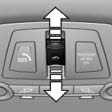
- Press the switch in the desired direction to the resistance point and hold it there. The sliding visor moves while the switch is being held.
- Press the switch in the desired direction past the resistance point. The sliding visor moves automatically. Pressing the switch again stops the motion.
See also:
Opening the main menu
Press the button.
The main menu is displayed.
All iDrive functions can be called up via the main
menu. ...
X5 Diesel in the Market
From a driver's perspective, the diesel X5 is a worthy effort: quick on its
feet and agile when it needs to be, yet comfortable for the long haul.
Well-to-do families might still give it a look — ...
Settings for the map view
The settings are stored for the remote control
currently in use.
1. "Navigation"
2. "Map"
3. "Options" Open.
4. "Settings"
Set the map view.
▷ &qu ...