
Buttons on the remote control
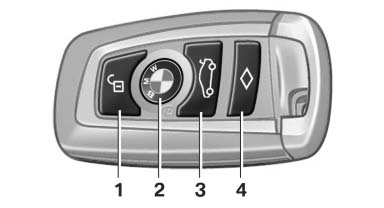
1 Unlocking
2 Locking
3 Opening the trunk lid
4 Panic mode*, headlamp courtesy delay feature
See also:
Buttons at a glance
Buttons at a glance
1 System on/off, interrupt
2 Resume speed
3 Store speed
4 Reduce distance
5 Store, maintain/change speed
6 Increase distance ...
Roadside Assistance
At a glance
BMW Roadside Assistance can be contacted if
assistance is needed in the event of a breakdown.
Roadside Assistance can also be contacted via
a Check Control message.
Start Roadside A ...
Map view for split screen
The map view can be selected for the split
screen independently from the main screen.
1. Open "Options".
2. "Split screen"
3. Move the controller to the right repeatedly
unt ...