
Instrument cluster
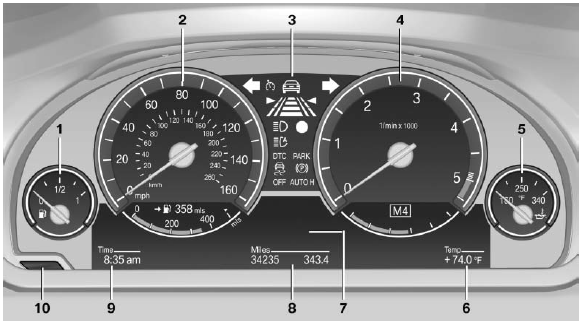
1 Fuel gauge
2 Speedometer
3 Indicator/warning lamps
4 Tachometer
5 Engine oil temperature
6 External temperature
7 Electronic displays
8 Miles, trip miles
9 Clock
10 Reset miles
See also:
High-beam Assistant
The conceptThis system automatically switches the high beams on and off. The procedure is
controlled by a sensor on the front of the interior rearview mirror. The assistant
ensures that the high b ...
Selection lists in theinstrument cluster
The concept
The following can be operated using the buttons
and the thumbwheel on the steering wheel and
the display in the instrument cluster:
► Current audio source.
► Redial on t ...
The concept
This system issues a warning at speeds above
approx. 40 mph/65 km/h if the vehicle is about
to leave the lane on roads with lane markings.
The steering wheel begins vibrating gently. The
time o ...