
Adjusting
Vehicle
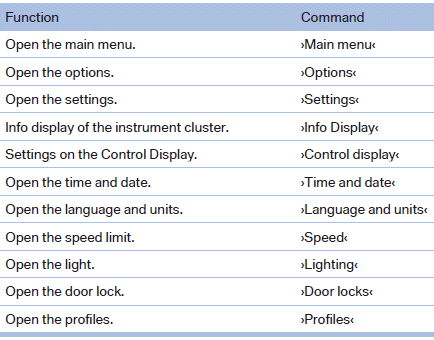
Equipment
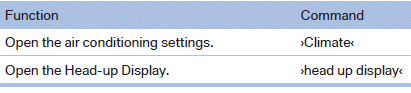
See also:
Speed limit
Display of a speed limit which, when reached,
should cause a warning to be issued.
Renewed warning if the vehicle speed drops below
the set speed limit once by at least 3 mph/
5 km/h.
Displayi ...
Mounts for the lower LATCH anchors
Correctly engage the lower LATCH anchors
Make sure that the lower LATCH anchors have
properly engaged and that the child restraint fixing
system is resting snugly against the backrest;
otherwi ...
Starting destination guidance
1. "Navigation"
2. Entering a destination.
3. "Accept destination"
4. "Start guidance"
The route is displayed on the Control Display after it ...