
Multi-channel playback,surround
Choose between stereo and multi-channel playback, surround.
Setting multi-channel playback, surround
1. "CD/Multimedia", "Radio" or "Settings"
2. "Tone"
3. "Surround"
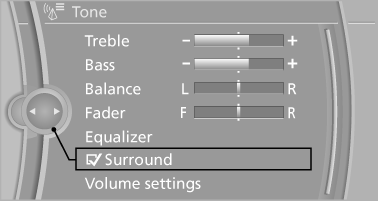
When surround is activated, multi-channel playback is simulated when a stereo audio track is played.
See also:
Navigation
This chapter contains various examples of how
the navigation system can guide you reliably to
your destination. ...
Safety switch for the rear
Press the button on the
driver's door if
children are being transported in the
rear.
This locks various functions so that they cannot
be operated from the rear: safety switch. ...
Manual transmission
Starting the engine
1. Depress the brake pedal.
2. Press on the clutch and shift to neutral.
3. Press the Start/Stop button.
The ignition is activated automatically for a certain
time and is sto ...