
Ventilation
Front ventilation
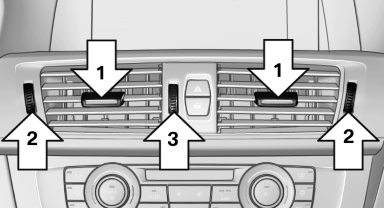
► Lever for changing the air flow direction, arrow 1.
► Thumbwheels for opening and closing the
vents continuously, arrows 2.
► Thumbwheel to vary the temperature, arrow3.
Toward blue: colder.
Toward red: warmer.
Adjusting the ventilation
► Ventilation for cooling:
Adjust the vent to direct the air in your direction, e.g., if the vehicle interior is hot from the sun.
► Draft-free ventilation:
Adjust the vent to let the air flow past you.
Ventilation in the rear
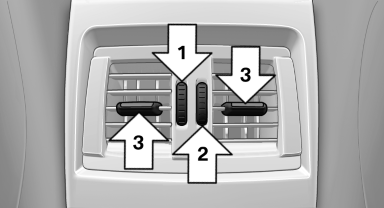
► Thumbwheel for opening and closing the
vents continuously, arrow 1.
► Thumbwheel to vary the temperature, arrow 2.
Toward blue: colder.
Toward red: warmer.
► Lever for changing the air flow direction, arrow 3.
See also:
Correctly adjusted head restraint
A correctly adjusted head restraint reduces the
risk of injury to cervical vertebrae in the event of
an accident.
Adjusting the head restraint
Correctly adjust the head restraints of all
occu ...
Components of the integrated Owner's
Manual
The integrated Owner's Manual consists of
three parts, which offer various levels of information
or access possibilities.
Quick Reference Guide
Located in the Quick Reference is important inform ...
Calls with multiple participants
General information
You can switch between calls or connect two
calls to a single conference call. These functions must be supported by the
mobile phone and
service provider.
Accepting a call ...