
Components of the integrated Owner's Manual
The integrated Owner's Manual consists of three parts, which offer various levels of information or access possibilities.
Quick Reference Guide
Located in the Quick Reference is important information for the operation of the vehicle, the operation of basic vehicle functions or for what to do in the event of a flat tire. This information can also be displayed during driving.
Search by pictures
Information and descriptions based on illustrations can be searched via search by pictures.
This is helpful, for example, if the description of an outfitting package that cannot be named is needed.
Owner's Manual
Information and descriptions can be searched by direct entry of a search term via the index.
Select components
1.  Press the button.
2. Turn the controller: open "Vehicle Info".
3. Press the controller.
4. Selecting desired range:
▷ "Quick reference"
▷ "Search by pictures"
▷ "Owner's Manual"
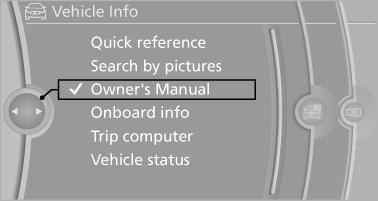
Select components
See also:
BMW 320i, BMW 318d and BMW 316d
In spring 2012, BMW will launch three further engines for the new sports
sedan series, all of them offering plentiful power and outstanding efficiency.
Following the impressive BMW 328i, the top f ...
General information
Whether or not text messages and e-mails from
the mobile phone are displayed depends on
whether transmission from the mobile phone to
the vehicle is supported. Text messages and emails
may not ...
Fuel quality
Fuels that are marked on the gas pump as containing
metal must not be used.
Refuel only with unleaded
gasoline without
metallic additives.
Do not refuel with any leaded gasoline or gasoline
...