
Collision warning
The concep
The system issues a two-phase warning of a danger of collision at speeds above approx. 10 mph/15 km/h. The time of these warnings may vary depending on the current driving situation.
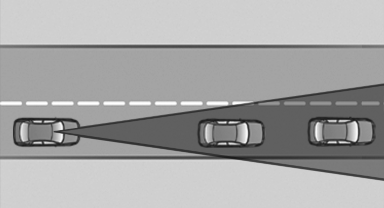
In the process, vehicles in a similar direction of movement are observed if they are located within the detection range of the system.
When the vehicle is intentionally brought into contact with a vehicle, the collision warning is delayed to avoid misleading warnings.
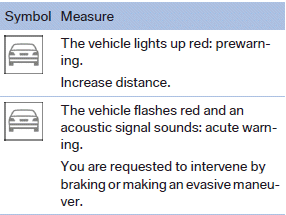
Warning stages
Prewarning
This warning is issued, for example, when there is the impending danger of a collision or the distance to the vehicle ahead is too small.
Acute warning
Warning of the imminent danger of a collision when the vehicle approaches another vehicle at a relatively high differential speed.
Switching the warning function on/off
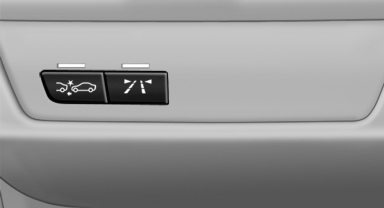
 Press the button
► On: the LED lights up.
► Off: the LED goes out.
The state is stored for the remote control currently in use.
Configuring the warning time
After the warning function is switched on, the warning time can be set via the iDrive.
The selected channel is stored for the remote control currently in use.
Display in the instrument cluster
The collision warning can be issued in the instrument cluster, in the Head-up Display, and acoustically.
Warning stages
 Adapting your speed and driving style
The display does not relieve the driver of
the responsibility to adapt his or her driving
speed and style to the traffic conditions.◄
System limits
Be alert
Due to system limitations, warnings may
be not be issued at all, or may be issued late or
improperly. Therefore, always be alert and ready
to intervene; otherwise, there is the danger of an
accident occurring.◄
Detection range
The detection capacity of the camera and the collision warning has limitations.
This may result in the warning not being issued or being issued late.
For example, the following situations may not be detected:
► Slow moving vehicles when you approach
them at high speed.
► Vehicles that suddenly swerve in front of you
or sharply decelerating vehicles.
► Vehicles with an unusual rear appearance.
► Two-wheeled vehicles ahead of you.
Functional limitations
The system may not be fully functional in the following situations:
► In heavy fog, rain, sprayed water or snowfall.
► In tight curves.
► If the camera view field or the front windshield
are dirty or covered.
► When driving toward bright lights.
► In the case of vehicles with insufficiently visible
tail lamps.
► In the case of partially covered vehicles.
► Up to 10 seconds after the start of the engine,
via the Start/Stop knob.
► During the calibration process of the camera
immediately after vehicle shipment.
Prewarning sensitivity
Depending on the set prewarning time, this may result in increased false warnings.
Camera
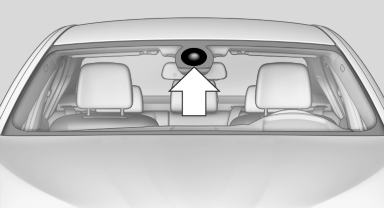
The camera is located near the base of the mirror.
Keep windshield clean and clear in the area in front of the interior rear view mirror.
See also:
Head restraints
Correctly adjusted head restraintA correctly adjusted head restraint reduces the risk of neck injury in the event
of an accident.
Adjust the head restraint in such a way that
its center is at ap ...
Activating/deactivating the functions
Several menu items are preceded by a checkbox.
It indicates whether the function is activated
or deactivated. Selecting the menu item
activates or deactivates the function.
The function is acti ...
Destination guidance with traffic
bulletins
Detour suggestions from the navigation system
can be manually accepted in the semi-dynamic
destination guidance. In the dynamic destination
guidance, they are automatically accepted
in the rou ...