
One lever for all functions
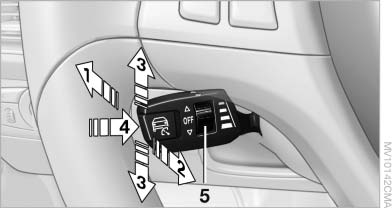
One lever for all functions
1 Storing and increasing the desired speed
2 Storing and red
3 Interrupting or deactivating the system
4 Retrieving the stored desired speed and distance or driving away
5 Selecting the distance to the vehicle ahead
See also:
Torsion-resistant body, optimal weight, wide range of safety features
The new BMW Series 1's lightweight body makes it more agile and improves
passenger safety, with high-strength steel being used to increase torsion
resistance and the strength of the passenger safe ...
Vehicle Overview
The X6, one of BMW's recent forays into SUV territory, is a tallish fastback
that the company calls a sports activity coupe. With seating for four, it's
basically a midsize SUV with four doors, ex ...
Redialing
General information
The list of dialed numbers in the mobile phone
is transmitted to the vehicle depending on the
mobile phone. The 20 phone numbers dialed
last are displayed. The sorting order ...