
Turn signals, front
24-watt bulb, PY24W
1. Rotate bulb holder to the left and remove it along with the bulb.
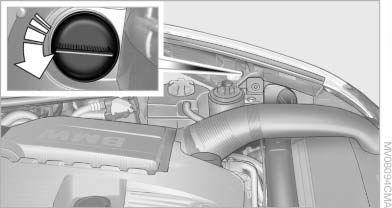
2. Rotate the bulb to the right along with the
socket and replace.
3. Install in the reverse order.
See also:
Manual air distribution
The air flow can be guided into the vehicle interior,
separately for the driver's and front passenger
side, using one of the following programs:
▷ Upper body region.
▷ Upper body reg ...
Swapping the telephone and additional telephone
The function of the telephone and additional telephone
can be swapped automatically.
1. "Telephone".
2. "Bluetooth® (phone)".
3. "Swap phone/addit. phone" ...
In the center armrest in the rear
Storage is possible in a vertical or horizontal position
in the center armrest. ...