
Hiding Check Control messages
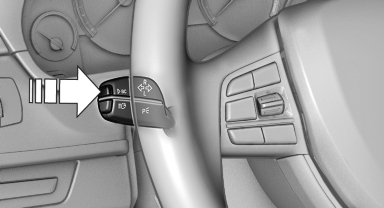
Press the computer button on the turn signal lever.
► Some Check Control messages are displayed continuously and are not cleared until the malfunction is eliminated. If several malfunctions occur at once, the messages are displayed consecutively.
These messages can be hidden for approx.
8 seconds. After this time, they are displayed again automatically.
► Other Check Control messages are hidden automatically after approx. 20 seconds.
They are stored and can be displayed again later.
See also:
Display on the Control Display
Switching on the backup camera via
iDrive
With Top View switched on:
"Rear view camera"
The backup camera image is displayed. The setting
is stored for the remote control currently i ...
Long-term vehicle storage
Your service center can advise you on what to
consider when storing the vehicle for longer
than three months. ...
Tire identification marks
Knowledge of the labeling on the side of the tire
makes it easier to identify and choose the right
tires. ...