
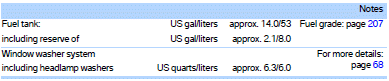
Capacities
See also:
What to do if...
Only a black screen is visible.
Switch on the system.
There are no options available on the screen.
Switch over between the display screens.
Radio stations or TV channels are grayed out ...
Notes on Emergency
Requests
Do not use the voice activation system to initiate
an Emergency Request. In stressful situations,
the voice and vocal pitch can change. This can
unnecessarily delay the establishment of a teleph ...
Changing the list view
The list view changes every time the first symbol on the navigation bar is pressed.
Information on the channel is displayed. ...