
Adjusting
 Danger of burns when screen is folded out
Do not reach behind the screen; otherwise,
there is the danger of getting burned. The
back of the screen can become very hot.◀
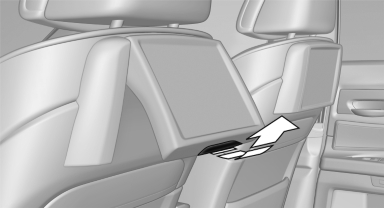
▷ To fold out: pull at the bottom edge.
▷ To fold in: press against the bottom edge.
See also:
Settings and playback functions for
audio CDs
1. Select "SET".
2. Press the button.
Settings and playback functions for
audio CDs
3. Make the settings with the remote control:
▷ "Tone":
▷ "Treble / B ...
Profile management
Opening the profiles
A different profile can be called up than the one
associated with the remote control currently in
use.
1. "Settings"
2. "Profiles"
3. Select a profil ...
Screw thread
Left/right cover in the bumper: press on the arrow
symbol on the cover.
BMW X5: front
BMW X6: front
Rear
...