
Folding forward
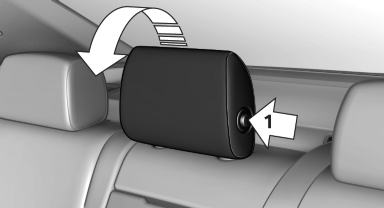
Press the button, arrow 1, and fold the head restraint forward.
See also:
Tasks
Displaying the task list
Display tasks that are due within the next
90 days.
1. "Office".
2. "Tasks"
Sorting the task list
1. Select the header in the task list.
2. Selec ...
The concept
Personal Profile concept
You can set several of your vehicle's functions
to suit your personal needs and preferences.
The settings are automatically saved in the
profile currently activated. ...
Status display
The tire and system status is indicated by the
color of the tires.
A change in the tire inflation pressure during
driving is taken into account.
A correction is only necessary if this is indicat ...