
Replacing the battery
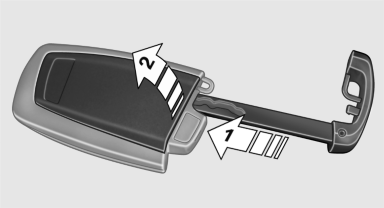
Replacing the battery
1. Take the integrated key out of the remote control.
2. Push in the catch with the key, arrow 1.
3. Remove the cover of the battery compartment; see arrow 2.
4. Insert a battery of the same type with the positive side facing upwards.
5. Press the cover closed.
 Take the used battery to a
recycling center
or to your service center.
Take the used battery to a
recycling center
or to your service center.
See also:
Digital compass
Digital compass
1. Adjustment button
2. Display
The display shows you the main or secondary
compass direction in which you are driving. ...
Received calls
Displaying calls
The 20 calls that were last received are displayed.
1. "Telephone"
2. "Received calls"
Calling a number from the list
Selecting an entry.
The connection is ...
The new BMW X6: dynamic, supreme, efficient, innovative
With the market launch of the new BMW X6, the combination of supreme
appearance, agile driving properties and hallmark brand efficiency so
characteristic of the Sports Activity Coupé is rai ...