
Units of measure
Setting the units of measure
To set the units for fuel consumption, route/distance and temperature:
1. "Settings"
2. "Language/Units"
3. Select the desired menu item.
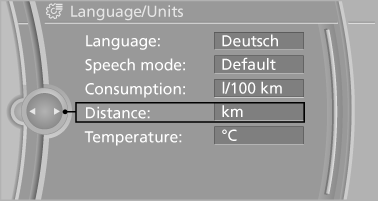
4. Select the desired unit.
The setting is stored for the remote control currently in use.
See also:
2010 BMW X5 M Review
On paper, the BMW X5 M seems about as incongruous as a car can be. It's a
five-seat midsize crossover powered by a 555-horsepower, twin-turbocharged V-8
engine that can accelerate from zero to 60 ...
Activating
1. Turn the light switch to or
.
2. Press the button on the turn signal lever, arrow.
The indicator lamp in the
instrument
cluster lights up.
When the lights are switched on, the
high b ...
Parking lamps/low beams
0. Lamps off, daytime running lights
1. Parking lamps and daytime running lights
2. Low beams, welcome lamps
3. Automatic headlamp control, daytime running lights, welcome ...