
Calling up information on the info display
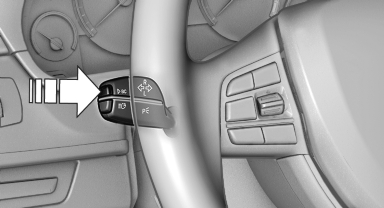
Calling up information on the info
display
Press the computer button on the turn signal lever.
Information is displayed on the info display of the instrument cluster.
See also:
Braking safely
Your vehicle is equipped with ABS as a standard
feature.
Applying the brakes fully is the most effective
way of braking in situations when this is necessary.
The vehicle maintains steering respo ...
Vehicle equipment
All standard, country-specific and optional
equipment that is offered in the model series is
described in this chapter. Therefore, equipment
is also described that is not available in a vehicle,
e ...
Ride & Handling
One of my lasting memories of the prior-generation X3 was its extremely firm
ride, which led to a choppy driving experience on rough roads. It was
disappointing, to say the least, because BMWs oft ...