
Settings for external devices
1.  Press the
button during playback.
Press the
button during playback.
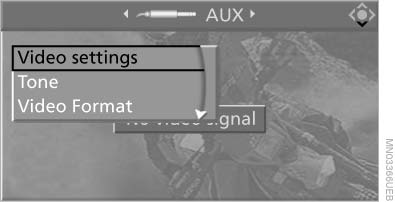
Settings for external devices
2. Make the settings with the remote control:
▷ "Video settings":
▷ "Brightness", "Color", and "Contrast" of
the video playback.
▷ "NTSC color": the color can be adjusted
on an external device with the NTSC
standard.
▷ "Standard": the DVD system can be
adapted to external devices with different
TV standards; to do so, consult the
operating manual of the external device.
▷ "Reset": The settings are reset to the
default values.
▷ "Tone":
▷ "Treble / Bass" and "Balance": separately
adjustable for the left and right
headphones and the infrared headphones.
▷ "Reset": your settings are reset.
▷ After switching to the top window, you
can change other settings.
"Audio": adjust the volume of the external
device to the volume of the CD/DVD
player.
"Language": the system language of the
DVD system.
"Display": background brightness of the
screen.
▷ "Video Format":
▷ "Standard"
▷ "Zoom": full-screen playback.
To exit from the menu:
 Press the buttons
on the remote control.
Press the buttons
on the remote control.
See also:
Driving tips
This chapter provides you with information useful
in dealing with specific driving and operating
modes. ...
Mounting
Information on mounting tires
Have mounting and balancing performed
only by a service center or tire specialist.
If this work is not carried out properly, there is
the danger of subsequent dam ...
Displaying contacts
General information
1. "Office"
2. "Contacts"
All contacts are listed in alphabetical order. Depending
on the number of contacts, an A-Z
search is offered.
A symbol indic ...