
Displaying messages
1. "Office".
2. "Messages"
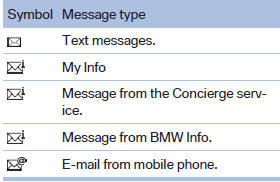
A symbol identifies the type of message.
See also:
Front
A storage compartment is located in the center
armrest between the front seats.
Opening
Raise the center arm rest.
Repositioning
Center armrest can be pushed in the longitudinal
direction. I ...
All around the headliner
All around the headliner
1
Emergency Request
2
Glass sunroof
3
Indicator lamp, front passenger airbag
4
Reading lamps
5
Interior lamps ...
Changing between panels
After a menu item is selected, e.g., "Radio", a
new panel is displayed. Panels can overlap.
▷ Move the controller to the left.
The current panel is closed and the previous
panel ...