
RDS
RDS broadcasts additional information, such as the station name, in the FM wave band.
Switching the RDS on/off
1. "Radio".
2. "FM".
3. "Options" Open.
4. "RDS"
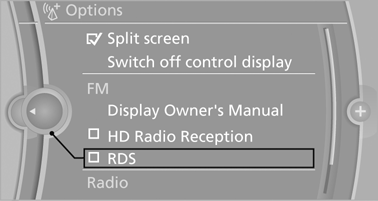
The setting is stored for the remote control currently in use.
See also:
Automatic-Transmission
Starting the engine
1. Depress the brake pedal.
2. Press the Start/Stop button.
The ignition is activated automatically for a certain
time and is stopped as soon as the engine
starts. ...
Removing and inserting
Cargo cover without partition net:
Removing
The cover can be removed to load bulky luggage.
Reach under the cover and turn it upward, arrows.
Pull the cover back horizontally.
Cargo cover ...
Automatic locking
The setting is stored for the remote control currently
in use.
1. "Settings"
2. "Door locks"
3. Select the desired function:
▷ "Lock if no door is opened"
...