
Opening the favorites
If an activated favorite is played back, the following message appears for approx. 20 seconds:
"Favorite alert!".
 "Favorites"
Select the symbol while the message is shown.
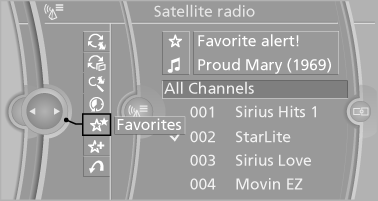
The displayed favorite is played.
If there is no message, the system changes to the My Favorites category. All favorites currently being broadcast can be selected from a list.
See also:
BMW Maintenance System
The maintenance system directs you to required
maintenance measures and thereby supports
you in maintaining road safety and the operational
reliability of the vehicle. ...
Run-flat tires
Label
RSC label on the tire sidewall.
The wheels are composed of special rims and
tires that are self-supporting, to a limited degree.
The support of the sidewall allows the tire to remain
dr ...
Communication
All of the options available to you for mobile
communication with family, friends, business
partners, and service providers are described in
this chapter. ...