
Front ventilation
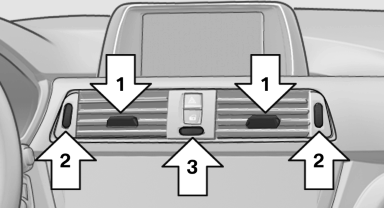
Front ventilation
▷ Lever for changing the air flow direction, arrow 1.
▷ Thumbwheels for opening and closing the vents continuously, arrows 2.
▷ Thumbwheel to vary the temperature, arrow 3.
Toward blue: colder.
Toward red: warmer.
Adjusting the ventilation
▷ Ventilation for cooling:
Adjust the vent to direct the air in your direction,
e.g., if the vehicle interior is hot from
the sun.
▷ Draft-free ventilation:
Adjust the vent to let the air flow past you.
See also:
Speed Limit Info with No Passing Info display and Speed Limit Device
In combination with the navigation system Professional or Business, Speed
Limit Info helps alert drivers to the current speed limit on the road on which
they are travelling. The camera integrated ...
Hot exhaust system
Hot exhaust system
High temperatures are generated in the
exhaust system.
Do not remove the heat shields installed and
never apply undercoating to them. When driving,
standing at idle and whi ...
Preparation
1. Check whether the battery of the other vehicle
has a voltage of 12 volts. This information
can be found on the battery.
2. Switch off the engine of the assisting vehicle.
3. Switch off any el ...