
Display in the instrument cluster
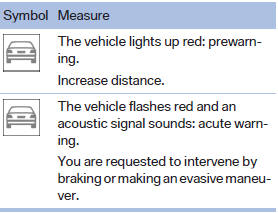
The collision warning can be issued in the instrument cluster, in the Head-up Display, and acoustically.
Warning stages
 Adapting your speed and driving style
The display does not relieve the driver of the responsibility to adapt his or her driving speed and style to the traffic conditions.
See also:
Malfunctions
Steering wheel vibration
Frequent activation of the steering wheel vibration
causes the system to overheat.
This causes Active Blind Spot Detection to become
deactivated.
Let the system cool an ...
Equalizer
Setting for individual audio frequency ranges.
Adjusting the equalizer
1. "CD/Multimedia", "Radio" or "Settings"
2. "Tone"
3. "Equalizer"
4. Sele ...
The concept
DSC prevents traction loss in the driving wheels
when driving away and accelerating.
DSC also recognizes unstable vehicle conditions,
such as fishtailing or nose-diving. Subject
to physical lim ...