
Radar sensor
Position
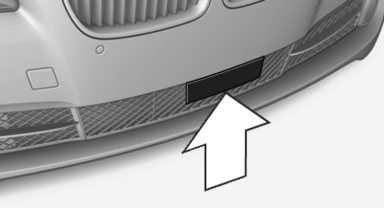
Radar sensor
Dirty or covered sensor
A dirty or covered sensor may hinder the detection of vehicles.
▷ If necessary, clean the radar sensor. Remove layers of snow and ice carefully.
▷ Do not cover the view field of the radar sensor.
Malfunction
The system cannot be activated if the sensor is not aligned correctly. This may be caused by damage incurred during parking, for example.
A Check Control message is displayed if the system fails.
For US owners only
The transmitter and receiver units comply with
part 15 of the FCC/Federal Communication
Commission regulations. Operation is governed
by the following:
FCC ID:
▷ OAYARS3-A
Compliance statement:
This device complies with part 15 of the FCC
Rules. Operation is subject to the following two
conditions:
▷ This device may not cause harmful interference,
and
▷ this device must accept any interference received,
including interference that may
cause undesired operation.
Any unauthorized modifications or changes to these devices could void the user's authority to operate this equipment.
Note
To reduce electromagnetic effects, please use properly.
The standard SAR value is 2.0 W/kg; the tested value of this product is 0.751 W/kg.
NCC declaration:
1. Companies or persons without authorization should not change the frequency, increase the power, or change the characteristics or functions of the original design of low-power radio frequency devices with type approval.
2. Low-power radio frequency devices should not impair legal communication or flight safety. If this type of impairment is detected, the device should be switched off immediately.
In this case, please contact the manufacturer and only use the product after the problem has been corrected.
3. The "legal communication" specified above refers to communication in accordance with telecommunication regulations. Low-power devices should withstand interference from legal communication and ISM devices.
See also:
Additional functions
Activating/deactivating the additional
functions
Activate the functions before pairing to be able
to use them in the vehicle. Information on suitable
mobile phones that support these functions,
r ...
General information
Lamps and bulbs make an essential contribution
to vehicle safety.
The manufacturer of your vehicle recommends
that you entrust corresponding procedures to
your service center if you are unfamil ...
Active seat
Active adjustment of the seat cushion's contours
reduces muscular tension and fatigue to
help prevent lower back pain.
Press the button. The LED
lights up. ...