
Front ventilation
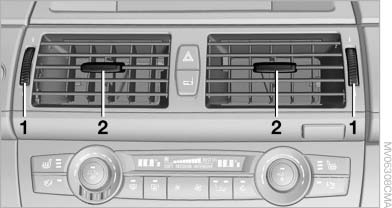
Front ventilation
1. Use the thumbwheels to smoothly open and close the air vents
2. Use the lever to change the direction of the air flow
 Avoiding injury
Do not drop any foreign objects into the air
vents, otherwise these could be catapulted outwards
and lead to injuries.◀
Ventilation for cooling
Adjust the vents to direct the flow of cool air in your direction, for instance if the interior has become too warm.
Draft-free ventilation
Set the air vents so that the air flows past you and is not directed straight at you.
See also:
Status display
The tire and system status is indicated by the
color of the tires.
A change in the tire inflation pressure during
driving is taken into account.
A correction is only necessary if this is indicat ...
Voice operation
Vehicles equipped with the voice activation system:
operation.
Vehicles not equipped with the voice activation
system: depending on the equipment, the mobile
phone can be voice operated as desc ...
Locking separately
The trunk lid can be locked separately using the
switch in the front center armrest.
Trunk lid secured, arrow 1.
Trunk lid not secured, arrow
2.
Slide the switch into the arrow 1 posit ...