
Switching the high beams on and off manually
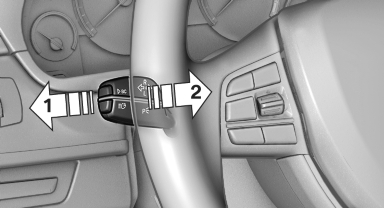
Switching the high beams on and off manually
▷ High beams on, arrow 1.
▷ High beams off/headlamp flasher, arrow 2.
The High-beam Assistant can be switched off when manually adjusting the light. To reactivate the High-beam Assistant, press the button on the turn signal lever.
See also:
The concept
The central locking system becomes active
when the driver's door is closed.
The system simultaneously engages and releases
the locks on the following:
▷ Doors.
▷ Trunk lid.
▷ ...
Have maintenance carried out
Have vehicles maintained regularly to achieve optimal vehicle
economy and operating life.
Have the maintenance carried out by your service
center.
Please also note the BMW Maintenance System ...
World firsts
The BMW 7-Series' drivetrain superiority is reinforced with a plethora of
automotive firsts. All BMW 7-Series can now be specified with the world's first
Head-up Display incorporating a speed limi ...