
Hiding Check Control messages
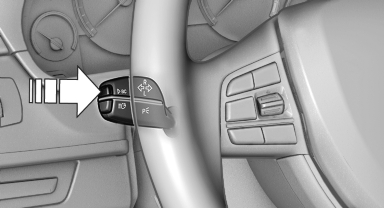
Press the computer button on the turn signal lever.
▷ Some Check Control messages are displayed continuously and are not cleared until the malfunction is eliminated. If several malfunctions occur at once, the messages are displayed consecutively.
These messages can be hidden for approx.
8 seconds. After this time, they are displayed again automatically.
▷ Other Check Control messages are hidden automatically after approx. 20 seconds.
They are stored and can be displayed again later.
See also:
Destination guidance with traffic bulletins
General information
Detour suggestions from the navigation system
can be manually accepted in the semi-dynamic
destination guidance. In the dynamic destination
guidance, they are automatically ...
Swapping the telephone and additional telephone
The function of the telephone and additional telephone
can be swapped automatically.
1. "Telephone".
2. "Bluetooth® (phone)".
3. "Swap phone/addit. phone" ...
Active steering
The conceptActive steering varies the turning angle of the front wheels in relation to steering
wheel movements. It also varies the steering force required to turn the wheels depending
on the spee ...