
Entering a phone number
Dialing a number
1. "Telephone"
2. "Dial number"
3. Select the digits individually.
4. Select the
symbol.
Select the
symbol.
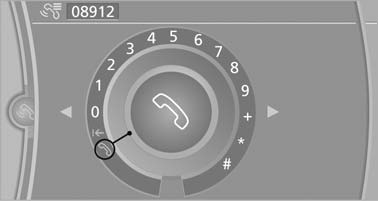
Dialing a number
The phone number can also be entered by voice.
See also:
Adjusting
The following settings are available:
"Rear displays"
"Language/Units": language can be set
globally for all screens.
"Tone"
...
Automatic headlamp control
Switch position :
the low beams are switched
on and off automatically, e.g., in tunnels, in twilight
or if there is precipitation. The LED next to
the symbol lights up.
A blue sky with the s ...
Using voice activation
Activating the voice activation system
1. Press
the button on the steering
wheel.
2. Wait for the signal.
3. Say the command.
The command is displayed in the instrument
cluster.
This symb ...