
Opening the favorites
If an activated favorite is played back, the following message appears for approx. 20 seconds "Favorite alert!".
 "Favorites"
Select the symbol while the message is shown.
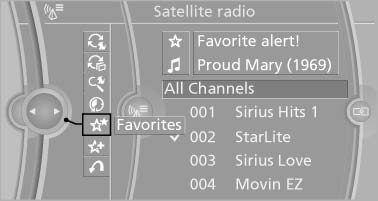
Favorites
The displayed favorite is played.
If there is no message, the system changes to the My Favorites category. All favorites currently being broadcast can be selected from a list.
See also:
Overview, instrument cluster
1. Miles/trip miles
External temperature
Time
Date
Range
Selection list, e.g., radio
Navigation display
Computer
2. Transmission display
Current fuel consumption
Energy recovery
3. ...
Entering appointment dates
Enter the dates for the required inspections.
Ensure that the vehicle date and time are set
correctly.
1. "Vehicle Info"
2. "Vehicle status"
3. "Service required" ...
Width, height
Width, height
1 Vehicle height without roof-mounted aerial: 56.3 inches/1,430 mm
Vehicle height with roof-mounted aerial: 56.7 inches/1,442 mm
2 Vehicle width, without mirrors: 71.3 inches/1,811 ...