
Storing favorites
Up to 30 favorites can be stored in the favorites list. Available favorites are artist, track, game, league, and team.
Storing the artist, track, or game
It is only possible to store favorites that are currently being broadcast. The channel information must be available.
1. "Radio"
2. "Satellite radio"
3. If necessary, open "All channels" or the desired category.
4. Select the desired channel.
5. Press the controller again.
6. Select the artist, track, or game.
Storing the league or team
Leagues or teams can be added to the favorites from a selection list.
1. "Radio"
2. "Satellite radio"
3.  "Manage
favorites"
"Manage
favorites"
4. "Add sports information"
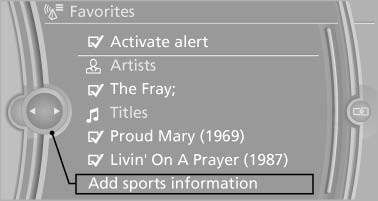
Add sports information
5. Select the league.
6. Select "Add all teams" or the desired team.
See also:
Address book
Selecting a destination from the
address book
1. "Navigation".
2. "Address book".
Contacts with addresses are displayed if
these have been checked as destinations.
If the m ...
Indicator/warning lamps
The indicator and warning lamps can light up in
a variety of combinations and colors.
Several of the lamps are checked for proper
functioning and light up temporarily when the
engine is start ...
Notes
CD/DVD player and changer
Do not remove the cover
BMW CD/DVD players and changers are
officially designated Class 1 laser products. Do
not operate if the cover is damaged; otherwise,
severe e ...