
Navigation bar overview
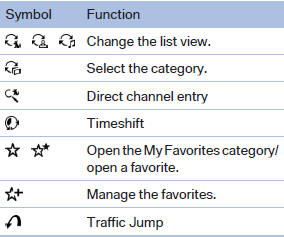
The functions of the navigation bar symbols can also be stored on the programmable memory buttons
See also:
The concept
Mobile phones or other external devices such as
audio players can be connected to the vehicle
via Bluetooth.
After these devices are paired once, they are
recognized automatically when the igni ...
Cargo area
Net
Smaller objects can be stored in the net on the
side of the cargo area.
To transport larger objects, it can be pushed
down.
Storage compartment under the cargo
floor panel
Raise the ca ...
Controls
1. Change entertainment sources
2. Change station/track
3. Programmable memory buttons
4. Volume, on/off
5. Change wave band ...